Frequently asked questions
Planning Your Trip
CITY IN TIME is a groundbreaking smart tourism project that brings Hong Kong’s history back to life through innovative technology. It transforms your smartphone into a “magic window” through time, allowing you to experience 360-degree panoramic images of old Hong Kong juxtaposed exactly with today’s surroundings. It was created by City University of Hong Kong for the Tourism Commission to enrich the experience of residents and visitors in Hong Kong using the combination of art and technology.
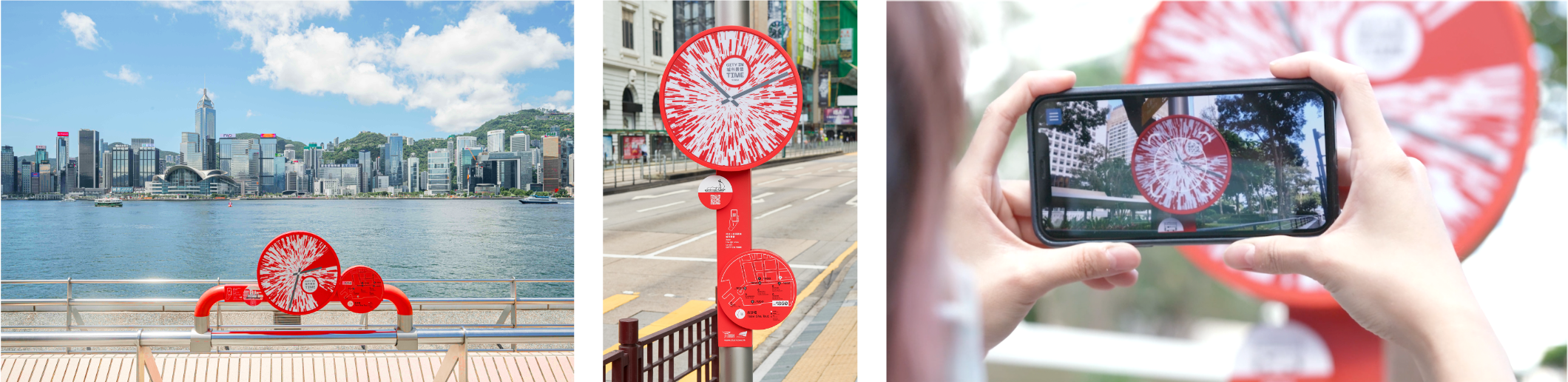
Augmented Reality (AR) is an immersive technology that overlays digital content— such as historical scenes, 3D animations, and soundscapes—onto the real world through your device’s camera lens. CITY IN TIME is a tourism project with the world’s first comprehensive deployment of AR in an urban environment that is robustly designed to enhance your experience of the past and present. By pointing your phone at our circular, red “AR Clocks”, you can compare 360-degree historical scenes of Hong Kong with the present-day environment.
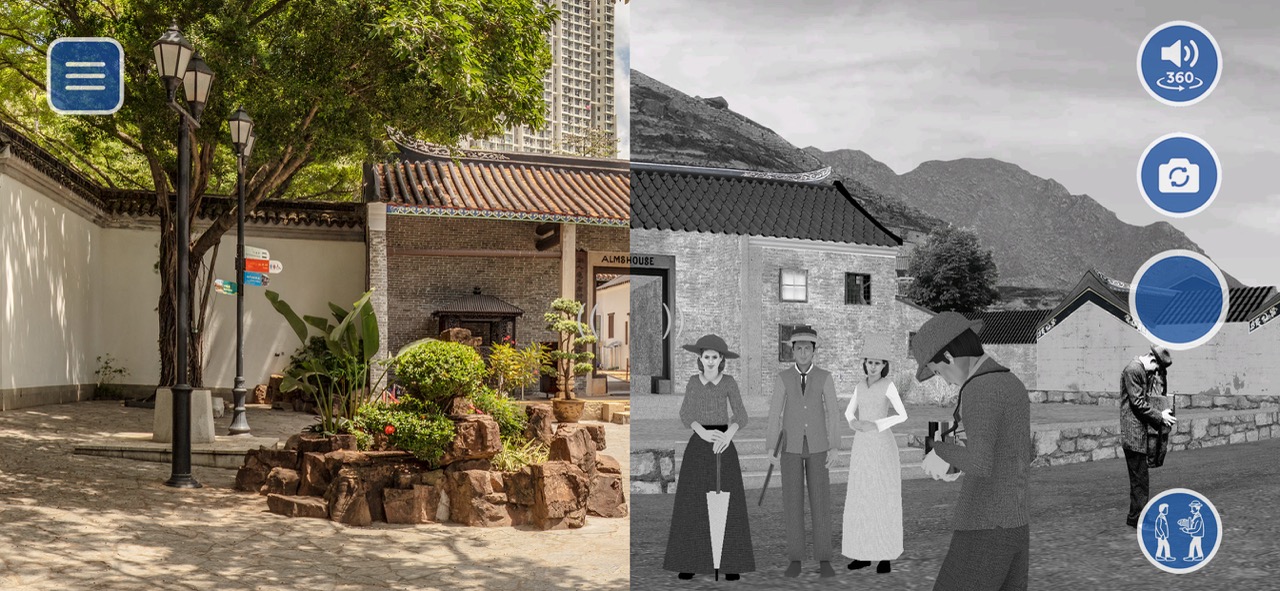
The app provides a series of immersive and interactive features to make history engaging:
- Past vs. Present Comparison: Swipe left or right on your screen to seamlessly compare 360-degree historical panoramas with your surrounding environment in real-time.
- Movie Hotspots: Relive iconic scenes from legendary Hong Kong films at their actual filming locations.
- Historical Narratives & Photos: Discover little-known historical facts, rare archival photos sourced from local and worldwide archives, and original oral histories provided by the local community.
- 3D Animations & Soundscapes: Immersive soundscapes and animated figures recreate the vibrant atmosphere of old Hong Kong.
- Selfies: Capture photos or videos of yourself integrated into historical landscapes and share them to social media.
Yes, The CITY IN TIME app is available for free download at the Apple App Store and Google Play.
Our 44 markers are strategically placed across Hong Kong, forming AR trails near iconic attractions. Each district features 5 to 8 markers, allowing you to easily integrate the AR journey into your sightseeing:
- Central & The Peak: Tai Kwun, PMQ, Statue Square, The Peak
- Tsim Sha Tsui: Clock Tower, Waterfront, The Peninsula Hong Kong
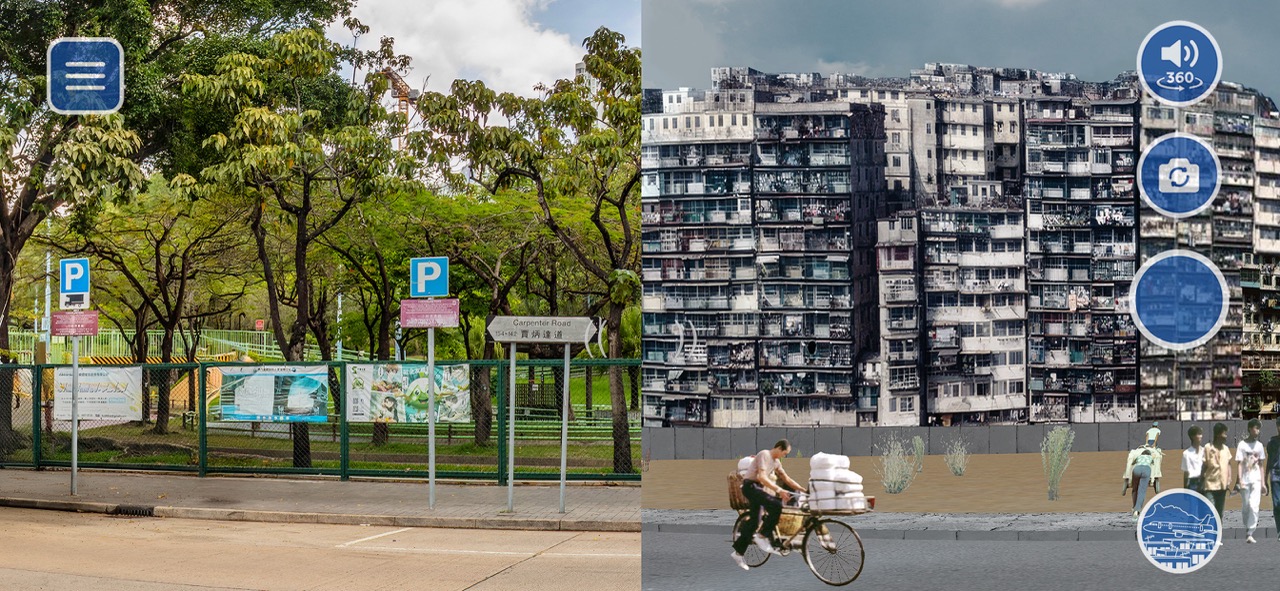
- Kowloon City: Kowloon Walled City Park, Kai Tak Sports Park
- Sham Shui Po: Garden Bakery, Mei Ho House, Nam Cheong Pawn Shop
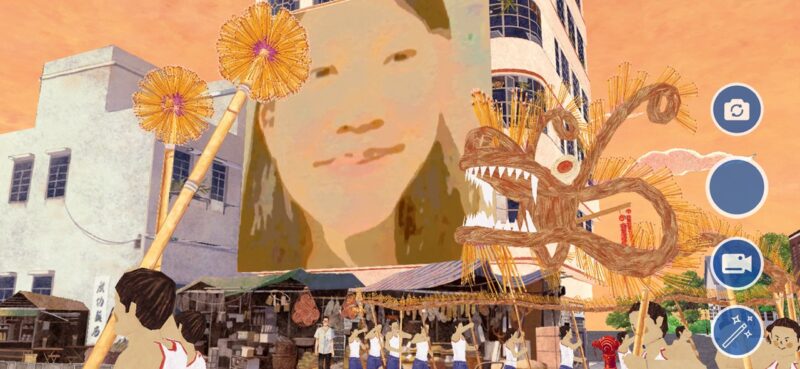
- Tai Hang: Tai Hang Fire Dragon Heritage Centre, Lin Fa Kung Temple
- Yau Ma Tei & Jordan: Temple Street, Fruit Market, Yau Ma Tei Police Station
- Lei Yue Mun: Lei Yue Mun Lighthouse, Lei Yue Mun Seafood Street
For detailed locations, please refer to the map on our website or use the map with GPS function within the app.
Our AR markers are strategically located near major landmarks and event venues, perfect for 15 to 30-minute explorations. No matter you are enjoying the Victoria Harbour views at the Tsim Sha Tsui waterfront, attending an event at Kai Tak Sports Park, or visiting the “Kowloon Walled City: A Cinematic Journey” Movie Set Exhibition at Kowloon Walled City Park, simply scan the nearby AR Clocks to add an immersive historical dimension to your visit.
The AR Clocks are visible in various lighting conditions. However, for the most realistic “past vs. present” comparison, daytime is recommended so that you can clearly see the modern architecture that the historical scenes are overlaid upon.
Certainly. While the AR functions are designed for on-site use, you can visit our website to remotely explore 360-degree historical scenes of all 44 locations. The web version allows you to compare panoramic photographs of the present environment with scenes of the past, alongside historical descriptions of major landmarks. No matter you are planning your trip or wish to revisit the scenes from afar, you can experience CITY IN TIME anytime, anywhere.
Where to Experience CITY IN TIME
- Step 1: Locate the Marker: Find the circular, red AR Clock installed at designated locations across the city.
- Step 2: Open the App: Download and open the CITY IN TIME app on your smartphone.
- Step 3: Scan the AR Marker: Point your smartphone camera at the marker.
- Step 4: Explore: Rotate your device to view the 360-degree panorama and use the on-screen slider to compare past and present views.
- Step 5: Interact: Tap on-screen icons to view historical narratives and videos, or enter selfie mode.
Yes, the app features a selfie function with filters that allows you to capture both still photos and short video recordings within the historical landscapes, perfectly integrating yourself into the 360-degree historical panoramas.

CITY IN TIME features “Movie Hotspots” where the app integrates selected movie clips from legendary Hong Kong films into their actual filming locations. You can find these at specific AR Clocks marked with movie icons, such as Statue Square in Central for City on Fire or Temple Street in Yau Ma Tei for Anita.


Both. CITY IN TIME serves as a multi-functional tool for self-guided and in-depth cultural travel. Using the app, travellers can embark on this immersive experience at their own pace and anytime, according to their personal itineraries.
Furthermore, it also acts as a digital resource for traditional group tours. The app enables tour guides to utilize historical descriptions, photos, and movie clips during their explanations, providing participants with a more diverse travel experience and a deeper understanding of Hong Kong’s heritage.
Absolutely. CITY IN TIME is a robust AR experience designed for all ages. Seniors can reconnect with the city’s past through historical scenes that spark personal memories, while young people engage with history via interactive 3D animations. The immersive 360-degree scenes and film clips encourage families to explore together.
Technical Support & Compatibility
CITY IN TIME app leverages smart tourism technology, using advanced AR to merge 360-degree historical panoramas with the real-time environment. By scanning the customized red “AR Clocks”, you can unlock an immersive experience where historical scenes align precisely with your current surroundings.
No. A constant connection is not required to enjoy the CITY IN TIME app experience. Internet access is only needed to download the app and the relevant location content. While we recommend doing this in advance for your convenience, you can also easily download the app and content on-site via your mobile data or available public Wi-Fi before you begin your journey.
The CITY IN TIME app is compatible with most iOS and Android devices and is available for free download on the Apple App Store and Google Play. For the best experience, we recommend using your device in landscape mode to view the historical panoramas.
If your device cannot support these platforms, you can scan the QR code located directly on the “AR Clock”, to access a web-based version. The web version allows you to compare historical scenes with present-day panoramas and provides information on relevant landmarks as well as historical photos.
The app and website are available in English, Traditional Chinese, and Simplified Chinese. You can easily switch languages within the app’s menu.